Bookshelf
- 4.2
- Rating
- 1.00M
- Installs
- Free
- Price

 Analysis by App-foxy
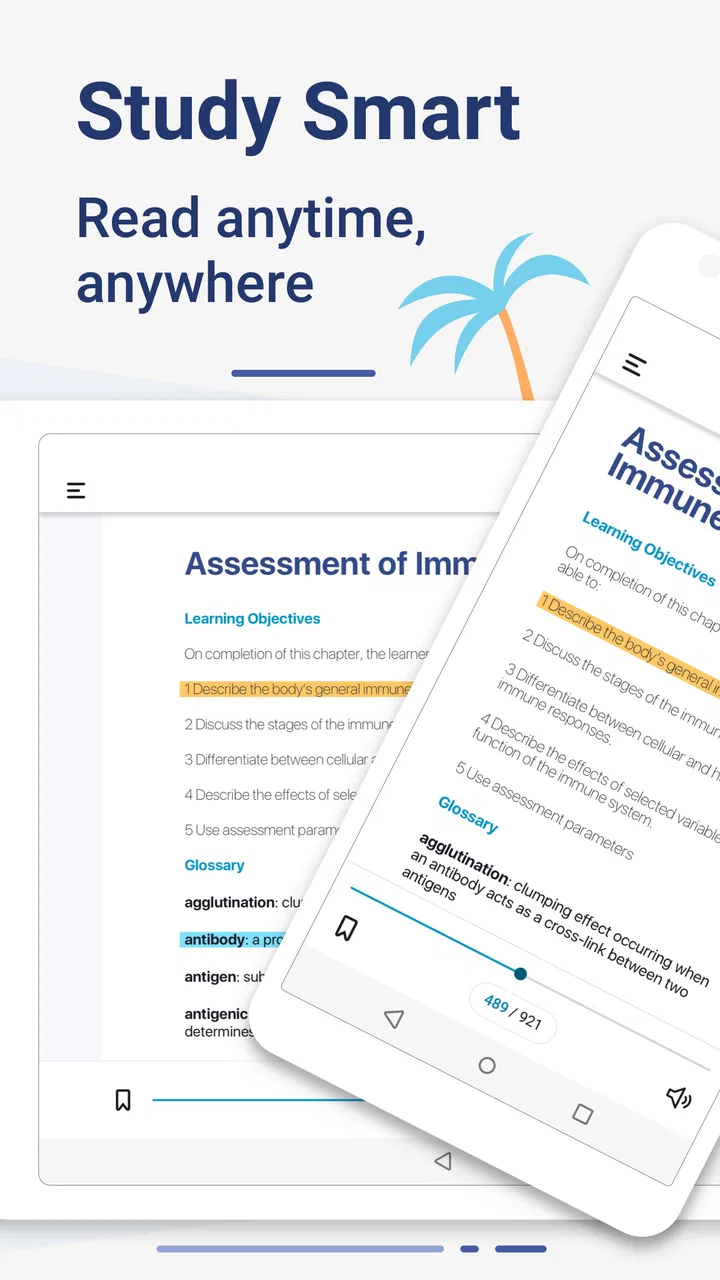
I found Bookshelf most useful when I stopped thinking of it as just an ebook reader and treated it as a study workspace. It is an education app from Vital Source Technologies, built around digital textbooks and the practical problem of keeping course reading available on a phone or tablet. The app is free to install, rated for Everyone, and has been available since March 29, 2012. Its current version is 11.3.1 and it works on Android 7.0 or later.
That combination makes it appealing for students who move between a personal device and a shared household screen. A textbook can be much easier to reach in a living room or kitchen than a large printed volume, but shared use also creates boundaries that are easy to overlook. Bookshelf works best when each reader has a clear account and understands that the library, notes, and reading activity belong to that person rather than to the whole household.
How Bookshelf fits into real study routines
I find Bookshelf fits best when study happens in small, repeatable moments rather than one long session: a quick look at a concept before class, then a return to the same topic when an assignment brings up a question. In this section, I’ll focus on how to turn that pattern into a routine that keeps the textbook useful without letting highlights or device sharing become distractions.
You May Also Like

 Blood Strike: 2.5 Anniversary
Blood Strike’s Loadouts Turn Every Drop Into a Tactical Gamble
A close look at Blood Strike’s custom loadouts: how fast access to signature weapons reshapes its battle royale rhythm, rewards preparation, and narrows the gap between fights.

 Pandora - Music & Podcasts
Pandora’s Music Is Easy to Start, but Harder to Recover
Pandora’s strength is its low-effort path from a seed to a station. Its weak spot is how much confidence it asks you to place in connection, setup, and quiet recovery.

 8 Ball Pool
 Is Built on Rivalries, Rematches, and Routine
A close look at the rivalries, rematches, shared routines, and unanswered safety questions that turn a quick pool match into a persistent mobile community.

 Samsung Music
’s Quiet Strength Is Playing What You Already Own
Its reach comes less from spectacle than from dependable access to a personal library. That simplicity is both the app’s strongest retention engine and its ceiling.

 AccuWeather: Weather Radar
AccuWeather Review: A Quick, Clear Forecast for Everyday Decisions
For everyday plans, the best forecast is the one you can understand quickly. AccuWeather makes rain timing, radar, and local conditions easy to act on, with a few trade-offs.

 Hill Climb Racing
Why Hill Climb Racing Still Turns Crashes Into One More Run
A tiny car, a bumpy hill and one more upgrade: Hill Climb Racing keeps resurfacing because its simple chaos makes every near-miss feel personal.
More From Our News Desk



A practical shared-device scenario
Imagine a student who reads during a commute, reviews a chapter at home, and then needs to check one diagram while another family member is using the usual computer. Bookshelf gives that reader a more flexible place to open course material. The important advantage is not simply replacing paper; it is reducing the number of places where the textbook has to be carried, stored, or searched.
In my experience, the app makes the most sense when reading is broken into short sessions. Ten minutes before class, a quick review at the kitchen table, or a search for a definition while doing homework are all situations where a digital textbook is more convenient than a physical copy. I would not choose it because I wanted a relaxing reading app. Academic books are still dense, and a phone screen can make long chapters tiring. The benefit comes from access and reference speed.
On a shared tablet, I would avoid leaving the app open on a personal account. Even when the device is used by people who trust one another, a textbook account can contain private notes, highlights, reading progress, or course-related material. The safest household habit is simple: finish the session, return to a neutral screen, and let the next person use their own account if they have one. That is not a special family feature; it is a sensible boundary for any shared device.
This setup also changes who the app suits. It can be a useful tool for a student whose household shares hardware, but it is not a replacement for separate profiles on the operating system or a family library designed around multiple readers. If several people need independent academic collections, each person should plan around their own login and purchasing or access arrangements rather than assuming that one Bookshelf account will neatly divide everything.
Setting up boundaries before the first chapter
The first useful decision is where the app belongs in your study system. I would install it on the device I am most likely to carry, then use a larger screen only when the household arrangement makes that practical. A phone is excellent for checking a passage or reviewing a short section. A tablet is more comfortable for diagrams, long pages, and side-by-side note-taking, but it is also more visible to other people in a shared room.
Before importing a full course routine into the app, I would check which account is signed in and whether the displayed library belongs to the intended reader. This small pause prevents a surprisingly common kind of confusion: opening a textbook under the wrong household account, adding notes in the wrong place, or assuming that another person’s reading list is available to everyone. Bookshelf is easier to manage when the account boundary is treated as part of setup, not as an afterthought.
There is also a useful distinction between access and ownership. Seeing a textbook in the app does not automatically mean that every person using the device should treat it as a shared household resource. A student may have access for a course, while a parent or sibling may only be helping with the device. Keeping that distinction clear avoids awkward questions about who can read, annotate, or continue a book later.
For younger readers, I would make the account conversation explicit. The Everyone age rating makes Bookshelf broadly suitable as an app, but that does not describe every textbook placed inside it. Academic content can be advanced, specialized, or inappropriate for a child’s current level even when the app itself is not restricted to adults. A parent should look at the actual books and decide whether the material fits the child, rather than relying only on the app’s general age label.
Coordinating reading without creating confusion
Bookshelf becomes more valuable when it is connected to a simple study routine. I like using a physical course schedule or a notes app to decide what must be read, then using the digital textbook for the actual reading and reference work. That division keeps the reader from expecting Bookshelf to organize an entire household or replace every planning tool.
A practical workflow is to begin each session by searching for the assigned topic instead of scrolling from the cover. After locating the relevant section, I would read a manageable portion, mark only the passages that genuinely matter, and write a short explanation in my own words elsewhere. This prevents the app from becoming a pile of highlights that looks productive but is difficult to revise later.
One non-obvious benefit of digital textbooks is the ability to move between broad reading and precise checking. I can read a chapter in sequence, then jump back to a term, figure, or definition when an assignment raises a question. That is where Bookshelf has a stronger case than a basic PDF viewer: a textbook-centered environment is better suited to returning to structured course material than a folder full of anonymous documents.
There is a trade-off, however. A physical textbook provides a strong sense of location: I remember that a concept was near the top of a left-hand page or several chapters after a familiar section. Digital reading can weaken that visual memory. To compensate, I would keep notes tied to chapter names and topics rather than writing vague comments such as “important section.” This makes later revision faster, especially when the same book is used across a semester.
For a household with more than one student, coordination should happen outside the app as well as inside it. Agree on which device is available, who needs quiet reading time, and whether the shared tablet is being used for study or entertainment. Bookshelf can provide the reading material, but it does not remove the ordinary scheduling problems of a shared home. That honest limitation matters: the app supports access, not household management.
What the reading experience does well
The strongest part of Bookshelf is its focus. It is designed for people who need to consult textbooks rather than casually browse a general ebook catalog. That focus makes it especially useful for students who repeatedly return to definitions, diagrams, chapter sections, and assigned material. Instead of treating a textbook as a single long file, I can approach it as a reference source that supports several kinds of study.
I also appreciate the way a digital textbook can reduce friction around carrying materials. A student with several classes may not want to bring every heavy book to school, work, or a study group. Having the material available on a compatible device is convenient, particularly when the goal is to check one passage rather than complete a full reading session.
The app’s long presence in the education category is reflected in its established user base. It has passed one million installs, carries a 4.3 average from around eighteen thousand ratings, and has roughly four thousand one hundred written reviews. Those figures suggest that Bookshelf is not an experimental reader with a tiny audience; it is a familiar option for people who already work with digital course books.
Still, popularity does not make every study task comfortable. I would rather read a long, theory-heavy chapter on paper or a generous tablet display than on a small phone. Screens can encourage skimming, and academic books often depend on diagrams, footnotes, tables, and page relationships that are easier to absorb physically. Bookshelf helps with portability, but it cannot change the nature of demanding material.
Where it differs from ordinary alternatives
Compared with a printed textbook, Bookshelf wins on portability and quick retrieval. A paper book wins on battery independence, visual orientation, and the ease of spreading several pages across a desk. If I am preparing for a focused exam session and already own the print copy, switching entirely to the app may not improve my concentration. If I am moving between locations or need to search a term quickly, the digital option is more persuasive.
Compared with a generic PDF reader, Bookshelf feels more appropriate when the material is supplied as a structured digital textbook. A PDF can be perfectly adequate for a short handout, but it often leaves the reader managing files, folders, and inconsistent document layouts. Bookshelf is a better fit when the main task is maintaining access to course books in one education-oriented place.
Compared with a general note-taking app, Bookshelf should not be expected to become the center of an entire knowledge system. I would use a separate tool for deadlines, lecture notes, group projects, and personal reminders. The textbook reader is most effective when it handles the source material while another system handles planning and synthesis.
That division also helps users decide whether the free app is enough for their needs. The installation costs nothing, which lowers the barrier to trying it, but the real value depends on the books and access connected to the account. Someone looking for a free collection of general reading should not install Bookshelf expecting that. It is a study access tool, not a universal library of free books.
Age, trust, and household expectations
Bookshelf can work in a family home, but I would introduce it with clear expectations. A child may use a parent’s tablet to read, yet that does not mean the child should alter the parent’s library or continue a private study session. Likewise, a parent helping with homework may need to open a chapter without taking over the student’s notes or reading history.
The best arrangement is usually separate device accounts where the operating system supports them, combined with separate Bookshelf accounts when multiple people need independent collections. If the household has only one account, everyone should understand that reading progress and annotations may become mixed. That can be manageable for a single student, but it is a poor long-term arrangement for siblings or partners studying different subjects.
Trust also matters because academic reading can reveal more than a title. Notes may show a student’s uncertainty, exam preparation, or personal interpretation of a sensitive subject. I would not treat a shared device as permission to browse another person’s study material. A short conversation about privacy is more useful than assuming that a general Everyone rating answers every age or family question.
For parents, the practical review question is not “Is the app safe for all ages?” in isolation. It is “Which book is being opened, whose account is active, and what kind of supervision does this reading situation need?” Bookshelf itself is an education app, but the content and the household context determine whether the experience is appropriate.
Small habits that make it easier to study
My first tip is to use the app for retrieval, not only linear reading. When revising, search for the exact concept you keep forgetting, then read the surrounding explanation instead of jumping directly to a single sentence. This preserves context and makes the digital format work to its strength.
My second tip is to keep annotations selective. Highlighting every definition makes none of them stand out. I would reserve highlights for ideas that connect to an assignment or exam objective, then keep a separate short list of questions that the textbook did not answer clearly. That list becomes useful during class or office hours.
My third tip is to plan for device handoffs. Before giving a shared tablet to someone else, close the reading session, check the visible account, and remove the book from the immediate screen if privacy matters. This takes seconds and avoids the uncomfortable situation where a sibling opens a personal chapter or a parent sees unfinished notes by accident.
A fourth useful habit is to compare digital and paper reading based on the task. Use Bookshelf for portability, searching, and quick reference. Use print or a larger display for long concentration sessions, complex figures, and chapters where spatial memory helps. Treating the formats as complementary is more realistic than insisting that one must replace the other.
Who should use it and who should skip it
I would recommend Bookshelf to students who receive or use digital textbooks, commuters who need course material away from home, and households where one device has to serve several people with clear account boundaries. It is also a sensible choice for readers who frequently search within academic books rather than reading every page in one uninterrupted sitting.
I would be more cautious if your main priority is distraction-free deep reading, if you strongly prefer the feel and layout of paper, or if you need a full family library with built-in household profiles and controls. Bookshelf does not solve every shared-device problem, and a generic reader may be simpler for people who only open ordinary documents.
The app is also less suitable for someone expecting one tool to manage an entire course. It can hold the reading experience, but assignments, deadlines, lecture notes, and group coordination still need their own methods. That is not a serious flaw; it is simply the boundary of what I think this app does well.
My household verdict
After using Bookshelf as a study reader, I see its main value in dependable access to digital textbooks and the ability to return to specific academic material without carrying a stack of books. Vital Source Technologies has kept the product focused on education, and that focus is more useful than a collection of decorative extras would be.
My recommendation comes with one condition: set up the account and device boundaries before the household starts sharing the screen. Keep personal reading separate, make the actual book—not only the app’s Everyone rating—the basis for age decisions, and use another tool for calendars and broader planning. Those habits prevent most of the friction I would expect in a family setting.
For a student who values portability and quick reference, the free Bookshelf app is worth trying. For someone who wants a universal ebook reader, a family-management system, or a perfect substitute for paper, I would choose differently. Its best role is a focused digital shelf for serious study, not a complete solution for every kind of reading or shared-device coordination.
FAQs for Bookshelf
01What is Bookshelf and how does it work?
Bookshelf is a digital library app designed for both Android and iOS platforms that allows users to store, organize, and read e-books and audiobooks. It provides an intuitive interface where you can easily categorize your books, mark your favorites, and track your reading progress. The app also offers synchronization across devices, so you can pick up right where you left off.
02Is Bookshelf free to use, or are there any hidden costs?
Bookshelf is free to download and offers a range of features at no cost. However, it also provides premium options that include additional features like ad-free browsing, exclusive book collections, and enhanced customization tools. Users can choose to make in-app purchases to access these premium features, but the basic functionalities are adequate for casual readers.
03What types of books can I access on Bookshelf?
Bookshelf supports a wide variety of book formats, including ePub, PDF, and audiobooks. It offers access to a vast library of genres, from fiction and non-fiction to educational and self-help books. Users can import their own e-books or purchase new ones directly through the app, ensuring a comprehensive reading experience.
04How does Bookshelf enhance the reading experience?
Bookshelf enhances the reading experience by offering customizable reading settings such as font size, background color, and brightness adjustments. It also includes features like bookmarking, note-taking, and highlighting, which make it easier to interact with the content. Additionally, Bookshelf’s audiobook player provides speed control and sleep timer options for a more personalized experience.
05Is Bookshelf compatible with multiple devices and platforms?
Yes, Bookshelf is compatible with both Android and iOS devices, and it supports synchronization across multiple platforms. This means you can start reading on your smartphone and continue on your tablet without losing your place. The app ensures your reading preferences and progress are updated in real-time across all your devices.
Pros
- Intuitive user interface for easy navigation.
- Syncs across devices for seamless reading.
- Wide variety of book formats supported.
- Offline reading mode available.
- Customizable display settings for comfort.
Cons
- Limited free book selection available.
- Occasional syncing issues reported.
- Requires account to access features.
- Ads present in the free version.
- No audiobook support at this time.

Bookshelf
Gallery